Organizing Your Genealogy: How I do it Part Two
I wrote in an earlier post on this topic but realized in preparing for a Genealogy class on Organizing I needed to give more specifics. How I do it may not work for you. You must develop I system where you can intuit where you filed something without thinking. Not what someone else decides is the way you SHOULD do it. After 50 years I do have very strong biases. While it sounds great to put birth certificates in a folder and deaths certificates in a folder when you are starting out, ultimately this isn’t very helpful overall. [Unless you have a very specific reason for doing so. [I have a death binder that includes all my ancestors back to second great grandparents for the purposes of analyzing how old they were at death and what they died from. But this is also duplicated elsewhere.] So in General file everything about a Surname in one digital folder, binder or folder. If you need to , you can break this into multiple sub-files or folders or binders but still under the Surname heading. Whatever you do for digital files use a similar organizing structure everywhere. KISS (Keep It Simple Stupid). I keep people with their families until they marry. This means if I am writing a narrative about them I will have to go to their parents family first.
By Surname
Since I am a stickler for advocating your job as a genealogist/family historian, is not to collect branches on your tree, but to tell the stories of your ancestors—my system for organizing is designed to facilitate Story Telling. everything about a person or family is filed together. Since I have the most information on my parents and grandparents they have binders of their own. In the case of my one grandfather I have a whole 3″ binder of just his letters organized with his outgoing letter [carbon] and the response from his brothers and sisters in chronological order. My system is the same whether it is organizing photos digitally or organizing binders, or digital files. So this a screenshot of my digital file structure:
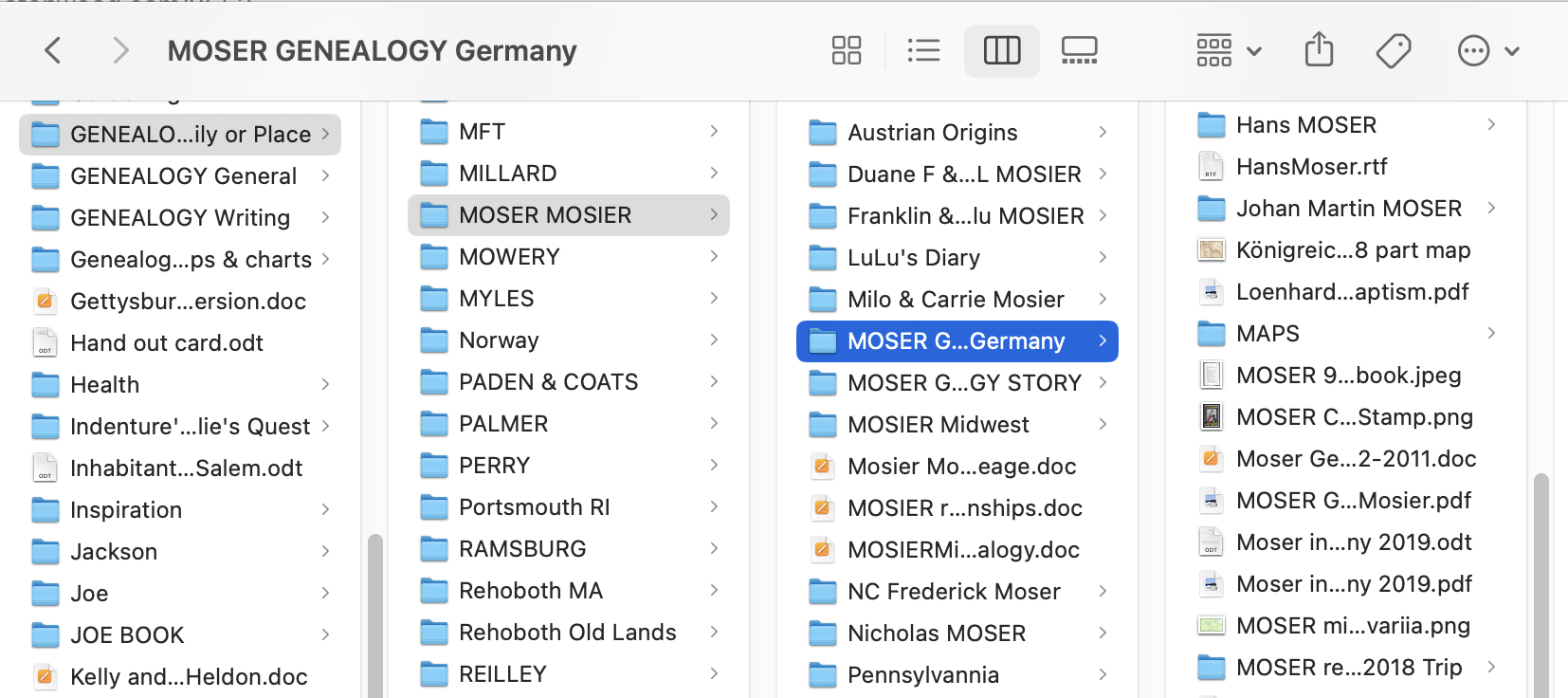
FOR DIGITAL FILES: Genealogy Family or Place > Surname> Family >Individual Family> and so on. Within an individual family there will be documents and photos as well as deeds, printed genealogies etc.
FOR BINDERS or FILE FOLDERS: Genealogy Family or Place > Surname> Family >5 Generation chart > Individual Family> Family Group Sheet (most recent family) >Chronological by family which includes photos, certificates, census etc.[as above]. At the front of the binder goes the 5 generation chart(s) and overall organizational things, like a research log or To DO list.
FOR PHOTOS: Genealogy> Place or SURNAME> Photos. If the Photos are too many organize into sub-file folders.
By Location
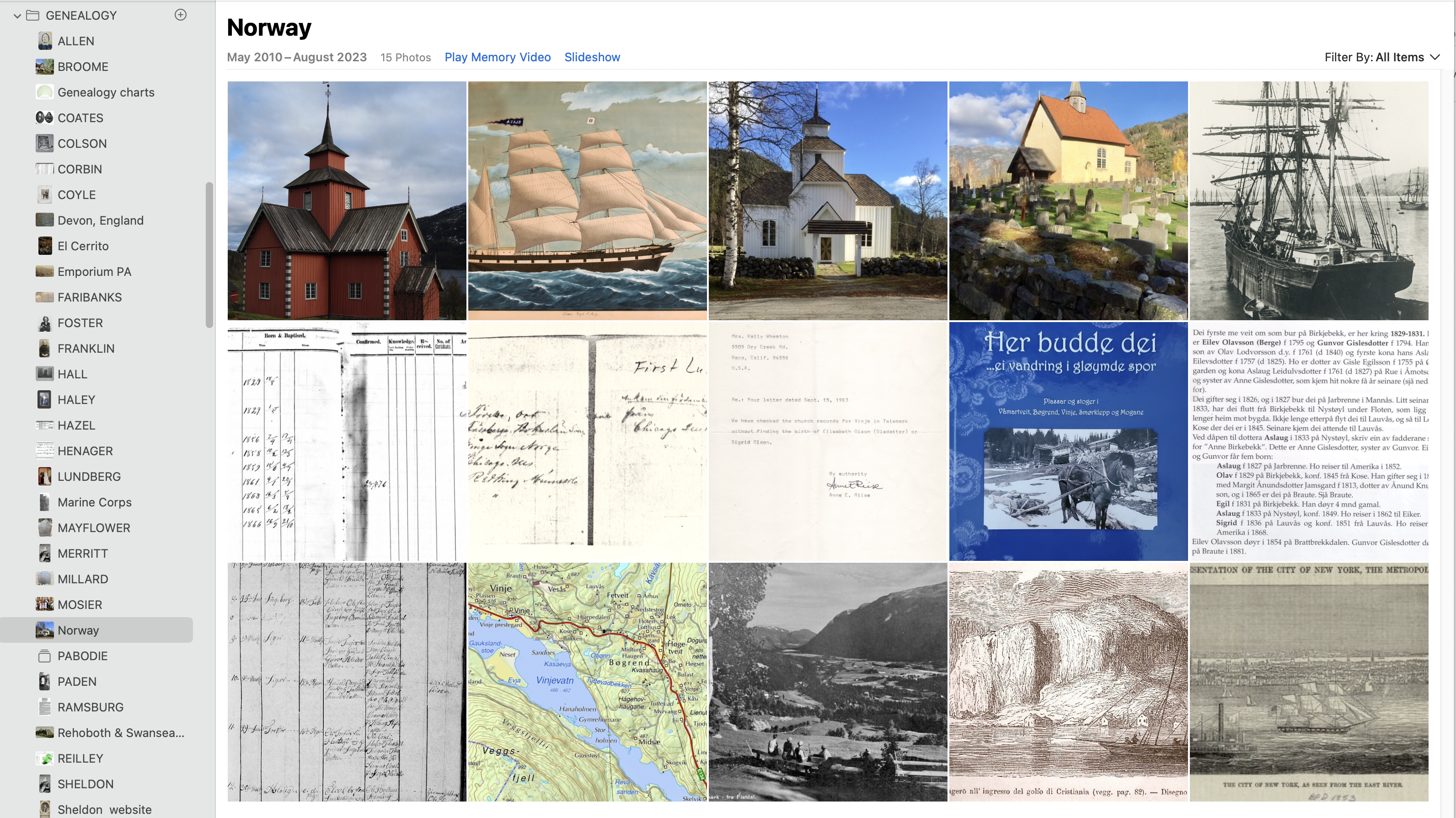
A big decision point is SURNAMES versus LOCATION. With Scandinavian names there are no SURNAMES when you get back a ways only Patronyms. So Surnames don’t work. That’s when I switch to a binder by LOCATION. Other times are when I have a Research Binder say on Ireland that has lots of information specific to Irish Research. It may contain a summary sheet of all my Irish families and the year of immigration. Another is when you get back far enough a whole Binder is too much for that surname but is perfect for inter-related families from a certain place. It may be a specific Town like Rehoboth, Massachusetts or Stonington, Connecticut. Or it may be a County. For instance there is no sense in duplicating a map in 5 different families when these share a common history.
The Bottom line is the way you organize should facilitate your story telling. I have physical file folders from a long time ago, Binders and Digital files. If I am working on a story I like to have things printed out to facilitate putting them in chronological order and not missing anything. I also like using an Individual Research Sheet [see previous post]. When I am actively working I will have a physical file I put stuff in. Eventually it will get filed elsewhere, but in story writing phase I need it handy. I have used binders with archival sheets forever. I use the heavyweight ones–well worth the extra cost. Especially important with original documents. Always make digital copies of important documents and share them freely. Use a cloud or back-up service to avoid disaster.
By Topic
I like to make charts or finding aids that facilitate my research. Sometimes these are prior to a research trip and I arrange the call numbers of locator identification. Sometimes they are a list of documents in a timeline. It can be a list of DNA Haplogroups of my families or a list of German surnames I am searching. These I make in Open Office [Microsoft Word, Open sourced substitute ] usually with the tables feature. Some examples to give you an idea. You can adapt to meet your own needs.
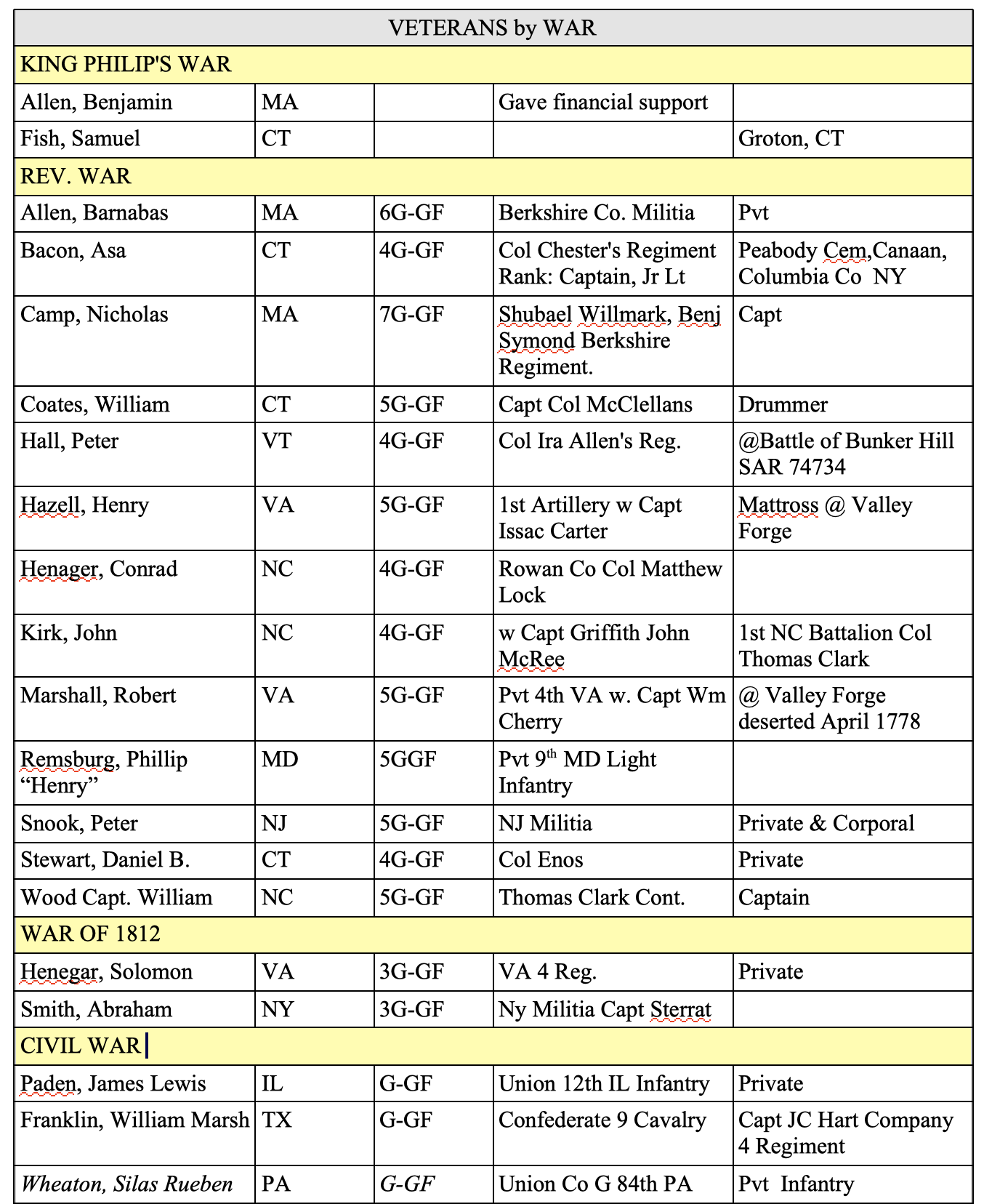

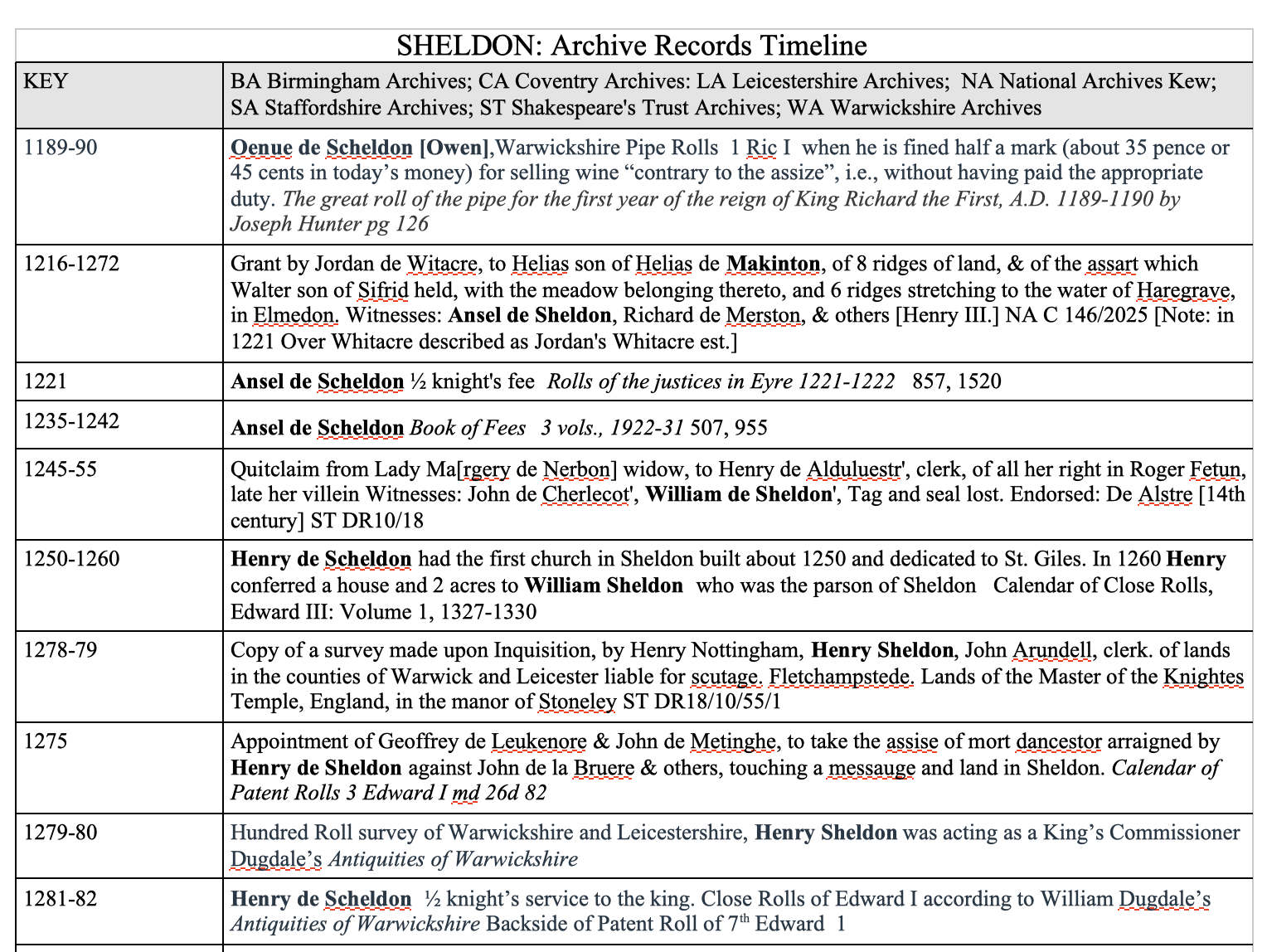
Remember that these are organizational tools for you, so make them the way they make sense to you. Using the Tables feature in any Word Processing program can help. More complex tables can be made with a Spreadsheet program like Excel. When you are building trees you may wish to your the suffix field to your advantage. In my tree I have too many “John SHELDON”s so adding the year of birth or a locale can help. SO rather than searching for John SHELDON in my tree and getting 6 pages of John SHELDONs , I might see a list that said Sir John SHELDON of Broadway or John SHELDON 1645. What ever organizing principles you use—they should make your life easier not more difficult.
NUMBERING & COLOR CODING

I don’t do any numbering in assigning a number to each ancestor. I started Fifty years ago with a couple of variations but frankly no one I know remembers ancestor #1103. I also did a system that used letters and numbers. They did not stand the test of time. I also used to keep a binder full of Five Generation Charts. I only put a 5 generation Chart at the beginning of a relevant surname or location binder. I do use numbers to identify lineages:
Justus Warren SHELDON ( Isaac 1, 2, John 3, 4, Isaac 5, Thomas 6, Isaac 7, Justus 8, 9, Elmer 10, Justus 11 Warren 12) For me this is far more helpful than #13,728. But as I always say do what works for you.
Otherwise I far prefer color coding. My basic color coding is warm colors for mother’s side and cool for fathers. Avery Color dividers come in packs of 15 Now I wish it was 16 [one for each 2nd great Grandparent] but I make do by combing one additional Swedish 2nd great grandparent to the same color. I use variations on these colors in Coding my DNA matches or organizing folders. Again it is a matter of personal preference, do what works for you. In general organize in a way:
- Which makes sense to you
- Makes it easy for you to find things
- Would make reasonable sense to someone inheriting your genealogy collection
- Is not to complicated or hard to remember
- Facilitates writing your ancestor’s [or your own] stories
When I am actively working I am not that organized. I follow innumerable gopher holes in all different directions. Eventually I have lots of maps and articles and resources and that’s when I pull it together in a blog post, story or series of stories. Again it is a personal process sometimes with a lot of trial and error. I tend to shun things that are too hard. This should be fun. Many people are more disciplined, but I have more fun! 😉
Kelly Wheaton ©2024 – All rights Reserved
 Wheaton Wood
Well you inspired me to start cleaning up my files – it’s too damn hot to be outside more than 5 minutes anyway and that’s with a hose on!
I find my “filing system” a bit of a mess because of my lineage society applications and the doc I need to amass for those. And the number of lines
Pingback: Friday’s Family History Finds | Empty Branches on the Family Tree